
KWFinder Review 2026: Features, Pricing, Pros & Cons for Bloggers
Beginner‑friendly keyword research tool for finding long‑tail, low‑competition keywords.
KWFinder by Mangools helps bloggers, affiliates, and small businesses uncover easy‑to‑rank long‑tail keywords, analyze keyword difficulty, and check SERP competition with a clean, intuitive interface that even beginners can use confidently.
Try KWFinder Now →If you are searching for a beginner‑friendly keyword research tool that actually helps you find low‑competition, high‑value topics, this KWFinder Review 2026 is for you. KWFinder by Mangools has become a popular choice among bloggers, SEO beginners, and small businesses because it makes long‑tail keyword research simple without overwhelming dashboards or enterprise‑level pricing.
In this in‑depth KWFinder review, you will see how this tool helps you discover long‑tail keywords, analyze keyword difficulty (KD), and understand SERP competition so you can plan content that actually ranks.
We will walk through its key features, including long‑tail keyword discovery, local keyword research, SERP analysis, and rank tracking, and compare where it stands against bigger suites like Ahrefs and Semrush.
Whether you are a new blogger, a niche site owner, or a small agency serving clients in the US or India, you will learn when KWFinder is the right keyword research tool, how its pricing and plans work in 2026, and when you might need KWFinder alternatives or more advanced SEO tools.
By the end of this review, you will clearly know if KWFinder is worth it for your SEO strategy and how to start using it effectively.
Ready to find easy‑to‑rank keywords with KWFinder?
KWFinder by Mangools helps you uncover long‑tail, low‑competition keywords in minutes, so you can plan blog posts that actually rank and bring targeted traffic from Google.
What is KWFinder?
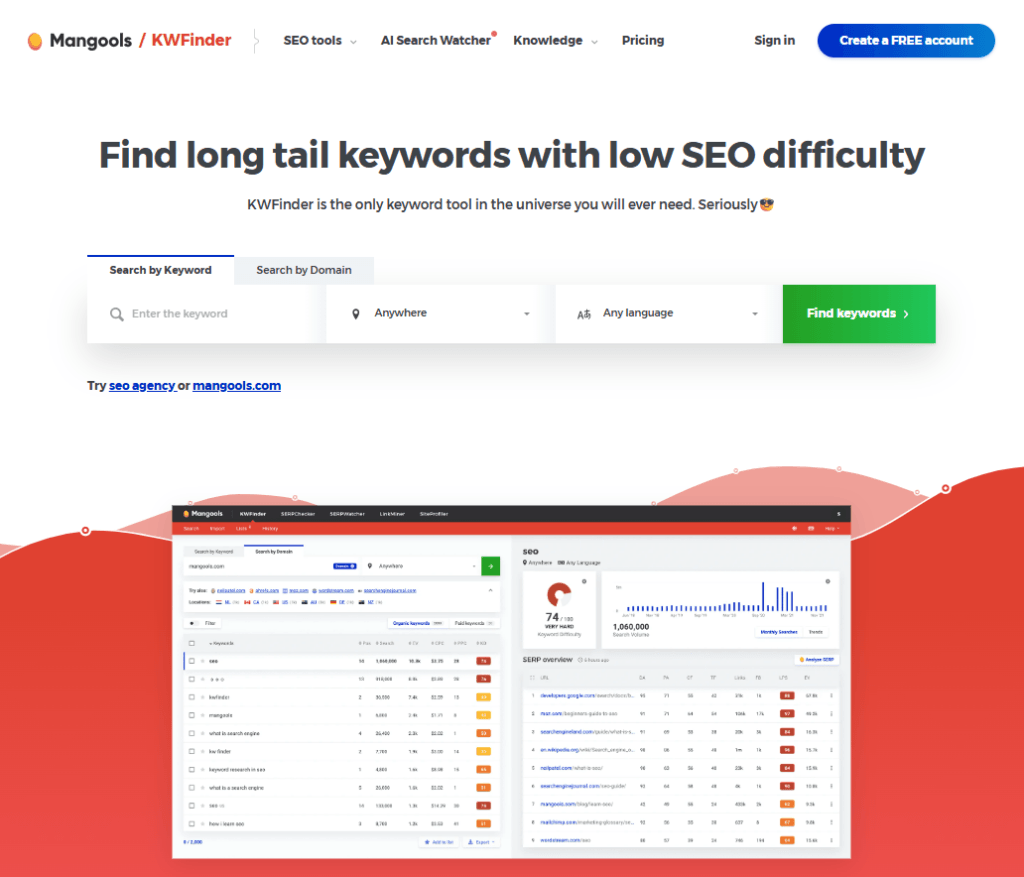
KWFinder is a cloud‑based keyword research tool from Mangools that focuses on finding long‑tail keywords with low SEO difficulty so you can uncover easy‑to‑rank topics for your blog or business website.
Unlike complex enterprise platforms, it is designed as a beginner‑friendly keyword research tool with a clean interface, clear metrics (search volume, CPC, keyword difficulty, trends), and fast keyword suggestions.
When you subscribe to KWFinder, you are not just getting a single keyword tool; you are unlocking the full Mangools SEO suite, which includes SERPChecker for SERP analysis, SERPWatcher for rank tracking, LinkMiner for backlink checks, and SiteProfiler for basic domain SEO metrics.
This makes KWFinder a practical starting point for bloggers, affiliate marketers, and small businesses who want a cost‑effective keyword research solution that also covers essential SEO tasks like SERP analysis and position tracking.
Key Features of KWFinder
1. Beginner‑friendly interface
- Clean layout: Simple dashboard with a search box, keyword list on the left, and detailed metrics plus SERP data on the right.
- Easy to understand: Shows search volume, CPC, PPC competition, keyword difficulty (KD), and trends in one view, so beginners are not overwhelmed.
- Ideal for non‑experts: Designed so bloggers, affiliate marketers, and small business owners in the US and India can start doing keyword research without deep SEO experience.
2. Long‑tail keyword discovery
- Suggestions tab: Generates a broad list of related keyword ideas using Google Keyword Planner data and Mangools’ own databases.
- Autocomplete tab: Mimics Google’s autosuggest to uncover real search variations with prefixes and suffixes (great for long‑tail keywords).
- Questions tab: Finds question‑based keywords (“how,” “what,” “why,” etc.) perfect for blog posts, FAQs, and featured snippets.
- Long‑tail focus: Makes KWFinder especially useful for finding easy‑to‑rank topics for new blogs and niche sites.
3. Keyword Difficulty (KD) meter and how it works
- 0–100 score: Every keyword gets a KD score from 0 (very easy) to 100 (very hard) based on the strength of the site’s ranking on page one.
- Data‑driven: Uses authority and backlink metrics of top‑ranking URLs to calculate how competitive a keyword is.
- Actionable guidance: Your existing KD ranges (very easy, easy, still easy, hard, etc.) help beginners quickly decide which keywords to target.
- Practical rule: New US and Indian blogs can start with long‑tail keywords in the lower KD ranges to get faster rankings.
4. SERP analysis with SERPChecker
- Integrated SERP view: Clicking a keyword shows the current top‑ranking URLs with metrics like domain authority, page authority, and backlinks.
- Competition check: Helps you see if the first page is dominated by big brands or if there are smaller blogs/local sites you can realistically compete with.
- Local SERPs: Works together with location settings so you can analyze SERPs for specific countries, states, or cities.
5. Rank tracking with SERPWatcher
- One‑click transfer: Send selected keywords from KWFinder directly into SERPWatcher to track their rankings over time.
- Daily updates: Monitor position changes, estimated traffic, and performance for each keyword you are targeting.
- Useful for clients: Ideal for bloggers, SEO freelancers, and small agencies who need simple rank tracking for US and India projects.
6. Local keyword research for US and India
- Deep location support: Choose from thousands of locations, including specific countries, states, regions, and cities.
- Localized metrics: Search volume and SERP results are tailored to the selected location and language (for example, “United States – New York” or “India – Bangalore”).
- Local SEO focus: Perfect for local businesses and service providers in India and the US that want to rank for city‑based and regional queries.
7. Keyword lists, import & export
- Project‑based lists: Save chosen keywords into lists for each blog, website, or client for better organization.
- Export options: Download keyword lists as CSV or spreadsheets for content planning, reporting, or further analysis.
- Bulk import: Upload existing keyword sets to quickly get KD, volume, and SERP data in KWFinder, which is very handy for agencies and advanced users
How to Use KWFinder (Step‑by‑Step)
KWFinder is designed as a beginner‑friendly keyword research tool, so you can start discovering profitable long‑tail keywords in just a few minutes.
Follow this simple KWFinder keyword research tutorial to learn how to create an account, run your first keyword search, and interpret the results for both global and local SEO campaigns in the US and India.
Step 1: Create your Mangools account
- Go through with this magical link of KWFinder page and click on the option to start your free trial or create a new account.
- Sign up with your email address; you can test the tool without adding a credit card, which is ideal if you are new to keyword research tools.
- Once your Mangools account is active, you get access not only to KWFinder but also to other tools in the suite like SERPChecker and SERPWatcher for SERP analysis and rank tracking.
Step 2: Enter a seed keyword and set location/language
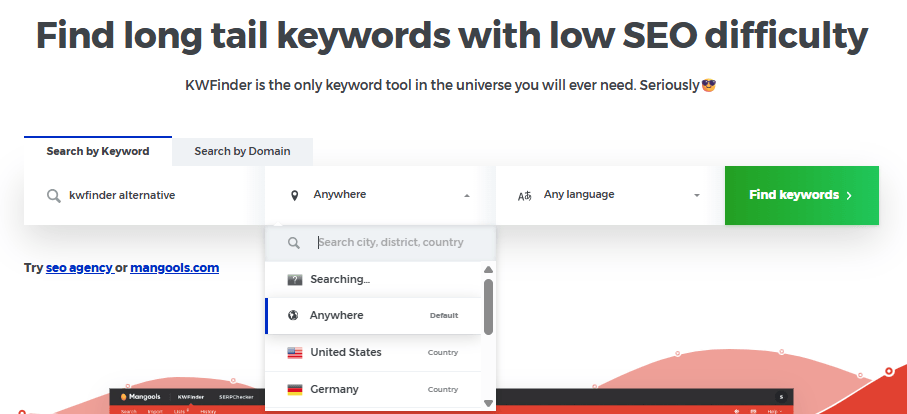
- After logging in, you will see three main tabs in the KWFinder interface: Suggestions, Autocomplete, and Questions.
- Type your primary seed keyword into the Suggestions tab and click the “Find Keywords” button to generate a list of related keyword ideas.
- Before you start the search, set the location and language fields:
- For a global audience or generic content, you can leave the default settings.
- For local SEO or geo‑specific campaigns, choose your target region, such as “United States” or “India,” and then refine down to state or city level if needed (for example, “California – Los Angeles” or “Karnataka – Bangalore”).
- Using the right location and language ensures that the search volume and SERP data reflect how users in your target market actually search.
Step 3: Filter keywords by KD and search volume
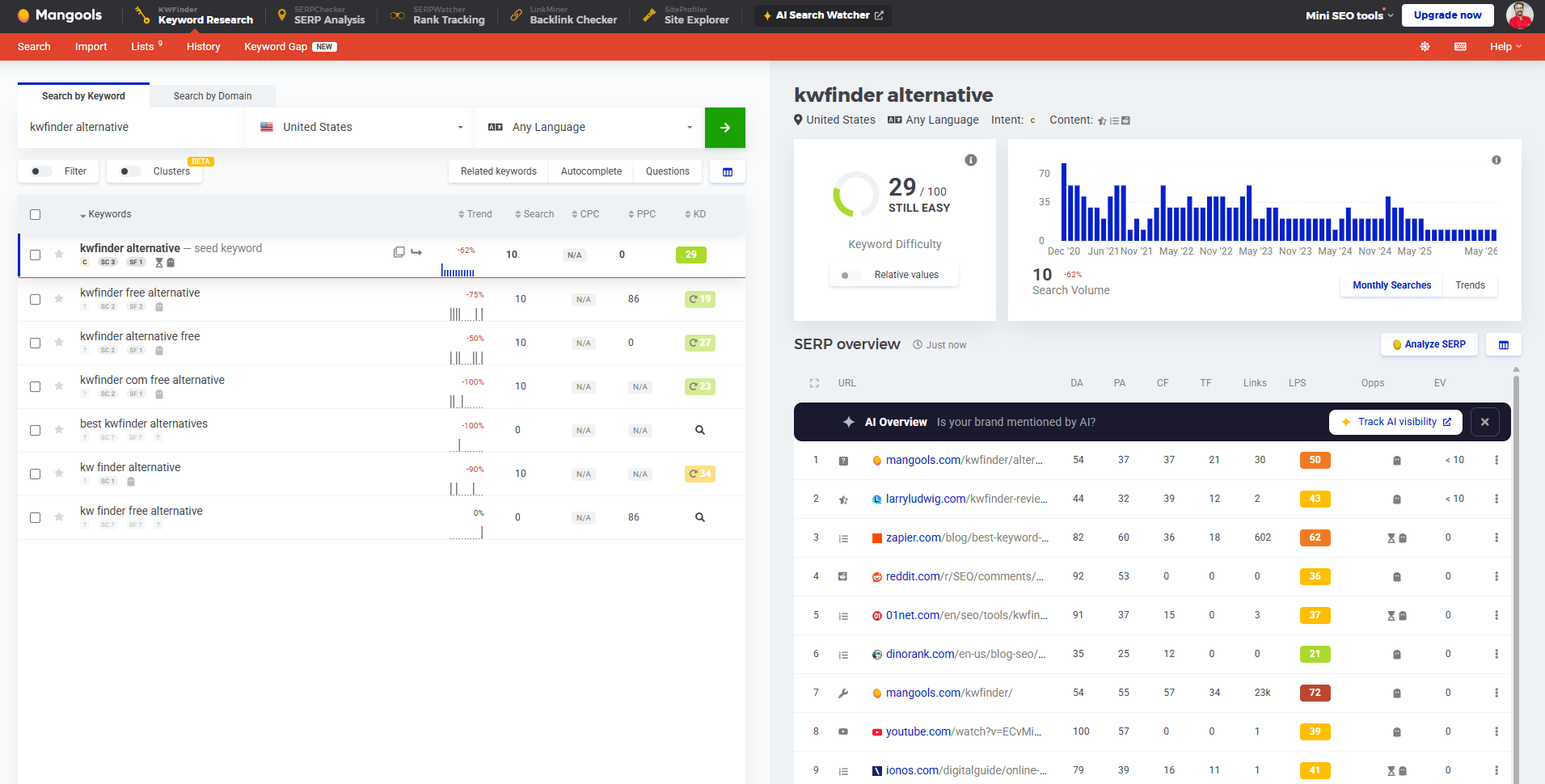
- After a few seconds, KWFinder displays a list of keyword ideas along with five key metrics: Trend, Search, CPC, PPC, and Keyword Difficulty (KD).
- Here is what each metric means:
- Trend: A small graph showing the search interest for the keyword over the last 12 months.
- Search: The average monthly search volume (exact match) from the past year.
- CPC: Average cost per click in Google Ads, useful for advertisers and monetization planning.
- PPC: Indicates the level of competition in paid search, from 0 (low) to 100 (high).
- Keyword Difficulty (KD): KWFinder’s metric that shows how hard it is to rank for the keyword in organic results, on a scale from 0 to 100.
- For a KWFinder Review 2026 audience (especially new bloggers and small site owners), a practical approach is
- Focus on long‑tail keywords (3+ words) with reasonable search volume.
- Prioritize keywords in the lower KD ranges, especially if your blog is new or your domain authority is still low.
Step 4: Analyze SERP and choose target keywords
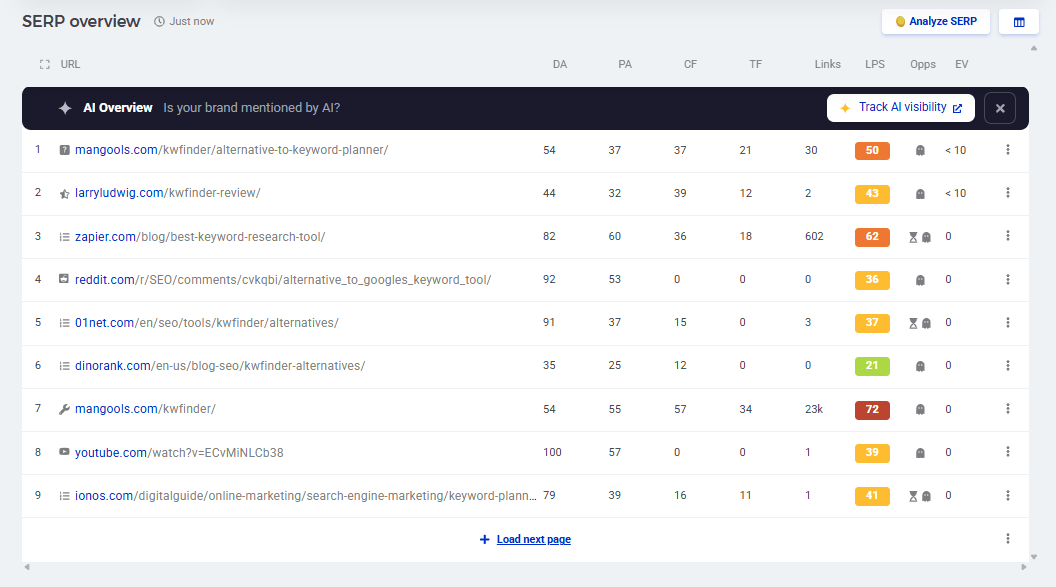
- To understand how competitive a keyword really is, click on it to view the SERP overview powered by SERPChecker.
- You will see the top‑ranking pages, along with metrics such as domain authority, page authority, backlink profiles, and sometimes estimated traffic.
- Use this SERP analysis to decide whether you can realistically rank:
- If the first page is dominated by large brands, government sites, or strong news portals, that keyword might be too difficult for a new blog.
- If you see smaller niche blogs or local business sites in the top results, the keyword is usually a better opportunity, especially for US and Indian bloggers targeting specific niches.
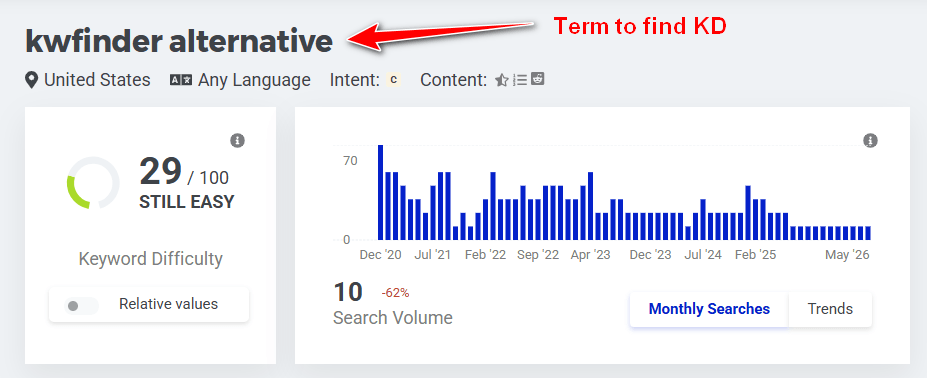
- Based on KD and SERP data, select the most promising keywords that match your content strategy and search intent (informational, transactional, or local).
Step 5: Build keyword lists and export to your content plan
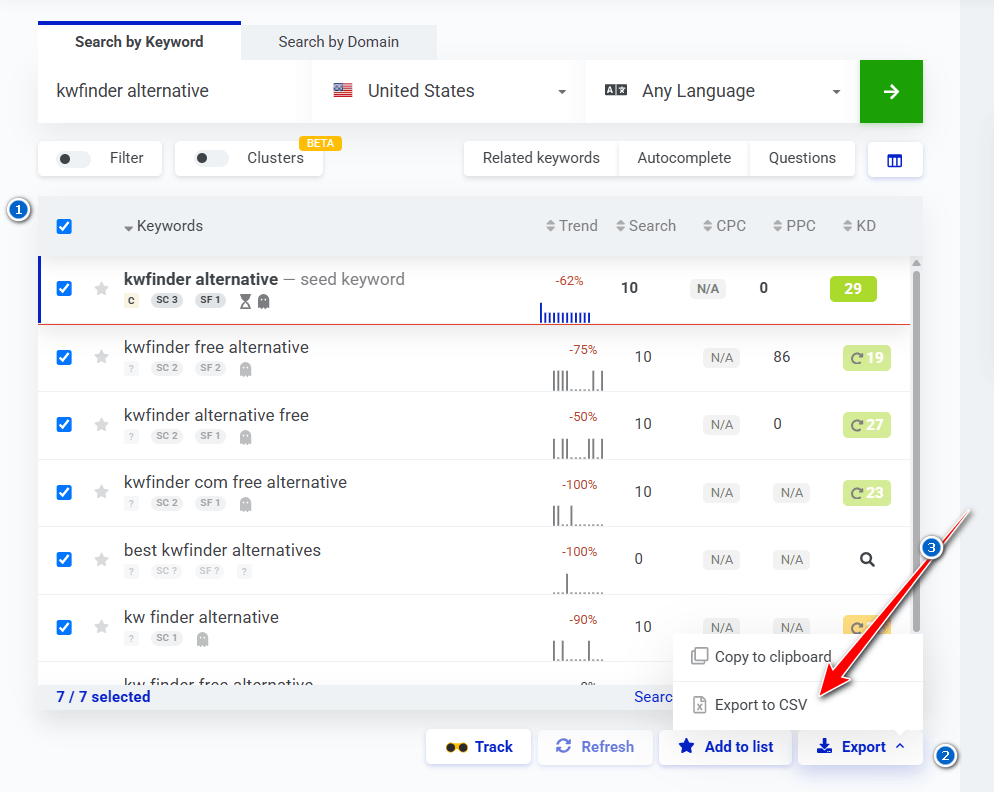
- As you find good keyword opportunities, add them to keyword lists inside KWFinder to keep your research organized by blog, project, or client.
- Create separate lists for different topics, categories, or locations (for example, “US SEO tutorials,” “India blogging tips,” and “local SEO – Bangalore”).
- When your list is ready, export the selected keywords to CSV or a spreadsheet so you can map them to blog posts, landing pages, and content clusters in your editorial calendar.
- You can also send your final set of keywords directly to SERPWatcher to start rank tracking, ensuring that your KWFinder keyword research translates into measurable SEO performance.
You’ve seen how KWFinder works – now try it on your own keywords.
Take a few seed ideas from your niche, plug them into KWFinder, and use the KD filters to build a list of long‑tail keywords for your next 10–20 blog posts or landing pages.
Try KWFinder on Your Niche →Suggested readings
How do I use the KWFinder tool effectively?
To show you how I use KWFinder in real projects, let us take a sample keyword: “How to find long-tail keywords.”
When I plug this into KWFinder, the tool shows around 90 monthly searches, a CPC of about $5.58, PPC competition of 29, and a Keyword Difficulty (KD) score of 52.
The most important number here is the KD score. In simple terms, it tells you how hard it will be to rank on the first page of Google for that keyword.
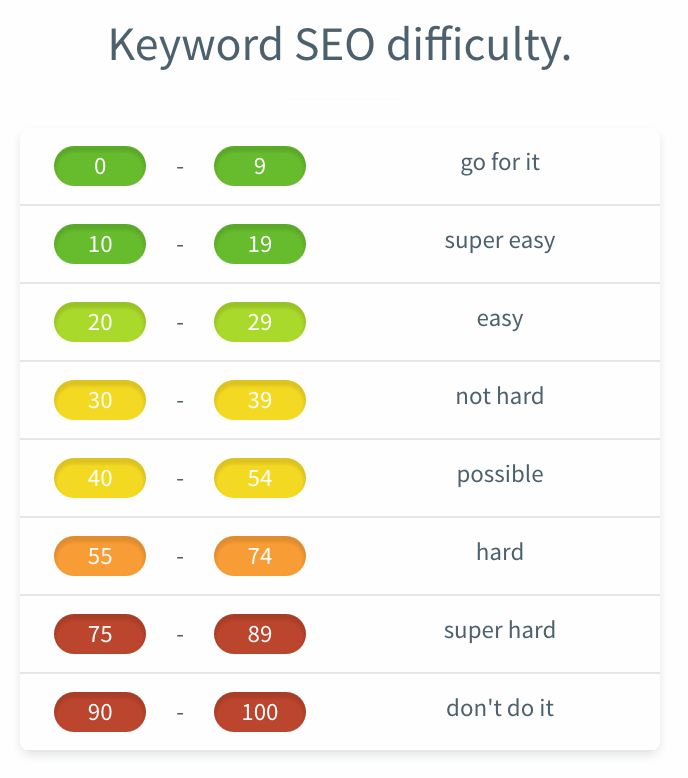
Before selecting any keyword from the results, I always compare its KD with a simple difficulty table to know whether it fits my blog’s authority and goals.
- 0–9: Extremely easy – you can usually rank with almost no effort.
- 10–19: Super easy – often called “low‑hanging” or easy‑win keywords.
- 20–29: Still easy – rankable with minimal effort and some basic on‑page SEO.
- 30–39: Moderate – needs stronger content and a few quality backlinks.
- 40–54: Competitive – requires solid content, link building, and good on‑page optimization.
- 55–74: Hard – usually dominated by strong sites; only worth targeting if you have good authority.
- 75–89: Very hard – expect serious competition from big brands.
- 90–100: Avoid – almost impossible to rank for most blogs; not worth the effort.
As a rule of thumb, for new or medium‑sized blogs, I focus on long‑tail keywords with KD below 30 and avoid anything above 55 unless the site already has strong authority.
This simple filter alone helps you skip “trap keywords” that look attractive by volume but are nearly impossible to rank for.
If you want consistent organic traffic from search engines, KWFinder is a great way to build a list of low‑competition, long‑tail keywords that you can actually rank for.
Use the filters on the KWFinder results page to narrow down keywords by KD, search volume, or length (for example, minimum three words), and then pick the best options for your next blog posts.
KWFinder Pricing & Plans
KWFinder is now part of the Mangools AIO SEO bundle, which means you pay a single subscription and get access to all Mangools tools: KWFinder, SERPChecker, SERPWatcher, LinkMiner, SiteProfiler, plus AI Search Watcher Pro.
In 2026, there are three main Mangools plans: Basic, Premium, and Agency. Each plan includes the full feature set, but they differ in usage limits—such as keyword research requests, SERP analysis lookups, rank tracking limits, backlink checks, and available user seats—making it easy to choose the best option based on your blogging or client workload.
| Plan | Billing | Price |
|---|---|---|
| Mangools Basic | Monthly | $30.50 / mo |
| Mangools Premium | Monthly | $40.50 / mo |
| Mangools Agency | Monthly | $70.50 / mo |
| Mangools Basic | Annual | $18.85 / mo (billed annually) |
| Mangools Premium | Annual | $26.35 / mo (billed annually) |
| Mangools Agency | Annual | $48.85 / mo (billed annually) |
Pricing is offered on monthly and annual billing cycles, with annual plans giving you around 35% savings compared to paying month‑to‑month

KWFinder by Mangools Basic Plan
$30.50/mon
$18.85 / mo (billed annually)
- 100 keyword research requests / 24h
- 200 keyword suggestions per 25 requests
- 100 SERP analysis requests / 24h
- 200 tracked keywords
- No extra user seats

KWFinder by Mangools Premium Plan
$40.50/mon
$26.35 / mo (billed annually)
- 500 keyword research requests / 24h
- Unlimited keyword suggestions per request
- 500 SERP analysis requests / 24h
- 700 tracked keywords
- 3 extra user seats

KWFinder by Mangools Agency Plan
$70.50/mon
$48.85 / mo (billed annually)
- 1,200 keyword research requests / 24h
- Unlimited keyword suggestions per request
- 1,200 SERP analysis requests / 24h
- 1,500 tracked keywords
- 5 extra user seats
Which plan should you choose?
- For solo bloggers and beginners (US or India) → Basic is usually enough to start.
- For growing blogs, SEO freelancers, and small teams → Premium offers more generous limits and extra seats.
- For agencies managing multiple clients → Agency provides the highest caps and up to 5 extra seats
Pros and Cons of KWFinder
Pros
- Very clean, beginner‑friendly interface that is easy to navigate, even for new bloggers and small businesses.
- Excellent for long‑tail keyword research using Suggestions, Autocomplete, and Questions tabs.
- Clear Keyword Difficulty (KD) meter (0–100) helps you quickly judge how hard it is to rank for a keyword.
- Strong local SEO support with detailed location and language targeting for US, India, and city‑level searches.
- One subscription unlocks the full Mangools bundle (KWFinder, SERPChecker, SERPWatcher, LinkMiner, SiteProfiler).
- Multiple pricing tiers (Basic, Premium, Agency) and extra savings on annual billing, so it works for solo users and agencies
Cons
- Daily limits on keyword research, SERP analysis, and rank tracking can be restrictive on the basic plan.
- Lacks some advanced features found in Ahrefs or Semrush, such as deep site audits and extensive backlink indexes.
- Data depth and reporting options may not satisfy enterprise‑level SEOs or large agencies.
- You need to switch between multiple Mangools tools (KWFinder, SERPChecker, SERPWatcher) to complete some workflows.
- Best Keyword Research Tools for SEO
- Search engine optimization for beginners
- Blogging for beginners guide
Who Should Use KWFinder?
KWFinder is not built only for SEO experts; it is designed to help a wide range of users who need clear, actionable keyword data without a steep learning curve. Understanding who gets the most value from this tool will make it easier to decide whether KWFinder fits your blogging, freelancing, or agency workflow.
Bloggers and niche site owners
- Ideal for new and intermediate bloggers who need a beginner‑friendly keyword research tool to find long‑tail, low‑competition topics.
- Great for niche site builders targeting specific sub‑topics or micro‑niches in the US and India.
SEO freelancers and small agencies
- Useful for freelancers managing a handful of client sites who need reliable keyword data, SERP analysis, and basic rank tracking without paying for enterprise suites.
- The Premium and Agency plans with higher limits and extra user seats work well for small teams and boutique agencies.
Local businesses and local SEO consultants
- Perfect for local businesses (restaurants, clinics, service providers, institutes) targeting city‑level or region‑specific search terms in India and the US.
- Local SEO consultants can quickly research location‑based keywords and analyze local SERPs to plan content and landing pages.
Who should look at alternatives instead
- Large agencies and enterprise SEO teams that require advanced site audits, deep backlink indexes, and all‑in‑one marketing features may be better served by tools like Ahrefs or Semrush.
- If you need a heavy technical SEO platform or a full marketing suite (PPC, social, content, and competitive intelligence in one tool), KWFinder on its own will feel limited
Best KWFinder Alternatives 2026
While KWFinder is an excellent keyword research tool for most bloggers and small businesses, it may not cover every use case or budget.
If you need deeper competitor analysis, more advanced technical SEO features, or want to compare pricing with other platforms, it is smart to look at a few KWFinder alternatives.
I have already reviewed the top competing tools in detail, including
- SEMRUSH
- AHREFS
- SERPSTAT
- SEMScoop
- SECockpit
- KeywordTool.io
- Rank Tracker
- Ubersuggest
- SpyFu
To explore these options and see which tool best fits your SEO strategy, check out my full guide here as Best KWFinder Alternatives.
Here is a personal‑tone section you can plug in as is and then tweak if you want to add specific stories or screenshots.
Suggested Readings:
My Personal Experience with KWFinder
I have been using KWFinder for several years across my own blogs and client projects, and it has become one of my go‑to keyword research tools for day‑to‑day work.
What I like most is that I can open the tool, enter a seed keyword, and within a few minutes have a list of long‑tail ideas, KD scores, and SERP data ready to plug into my content calendar.
For new blogs—especially in competitive niches—I usually start by filtering for lower KD long‑tail keywords and then checking the SERP overview to see whether similar blogs are already ranking.
This simple workflow has helped me publish posts that start getting impressions and clicks much faster, both for Indian audiences and US‑focused content.
I also appreciate how easily KWFinder connects with SERPWatcher. After selecting keywords for a new article series, I send them to rank tracking and monitor positions over the next few weeks.
Seeing those keywords gradually move up reinforces that the KD ranges and keyword choices were correct, and it gives me confidence to double down on similar topics.
Is KWFinder perfect? No. When I work with larger brands or need deep technical SEO and backlink analysis, I still rely on heavier tools like Ahrefs or Semrush.
But for most blogging, affiliate, and small‑business projects where I need clean data, long‑tail keyword ideas, and quick SERP checks in a user‑friendly interface, KWFinder continues to deliver exactly what I need in 2026.
Other Review:
Frequently Asked Questions (FAQs) on KWFinder Review 2026
What is KWFinder and how does it work?
KWFinder is a cloud‑based keyword research tool from Mangools that helps you find long‑tail keywords with low SEO difficulty. You enter a seed keyword, choose a location, and KWFinder returns related ideas with search volume, CPC, and a Keyword Difficulty (KD) score so you can pick realistic targets.
Is KWFinder still worth it in 2026?
Yes, KWFinder is still worth it in 2026 for bloggers, small businesses, and SEO freelancers who need a beginner‑friendly tool. It offers strong long‑tail keyword discovery, clear KD scoring, and local SEO support at a lower price than many enterprise tools like Ahrefs or Semrush, especially on annual Mangools plans.
Who should use KWFinder?
KWFinder is ideal for new and intermediate bloggers, niche site owners, local businesses, and small SEO agencies. If you primarily need keyword ideas, SERP analysis, and simple rank tracking for markets like the US and India, KWFinder and the Mangools bundle give you everything required to plan and optimize content.
What are the main pros and cons of KWFinder?
KWFinder’s main pros are its user‑friendly interface, powerful long‑tail keyword discovery, clear KD scores, and strong local keyword research features. The main cons are daily limits on lower plans and fewer advanced features than all‑in‑one suites like Ahrefs or Semrush, which may matter to enterprise‑level SEO teams.
How much does KWFinder cost in 2026?
In 2026, KWFinder is sold as part of the Mangools AIO SEO bundle, with Basic, Premium, and Agency plans available on monthly or annual billing. Monthly prices start around $30.50, while annual plans reduce the effective monthly cost to about $18.85 for Basic, with higher tiers for teams and agencies.
Is there a free trial for KWFinder?
Yes, Mangools offers a free trial so you can test KWFinder and the other tools before buying. The trial includes limited keyword research and SERP lookups but is enough to see how the interface works, evaluate KD scores, and decide if the Mangools bundle fits your SEO workflow.
Is KWFinder good for local keyword research in the US and India?
KWFinder is very strong for local SEO because it supports thousands of locations, including countries, states, and cities. You can target queries like “digital marketing agency New York” or “best coaching institute Bangalore” and see local search volumes and SERPs, which is perfect for US and Indian businesses.
How accurate is KWFinder’s Keyword Difficulty (KD) score?
KWFinder’s KD score is generally accurate enough for bloggers, small businesses, and freelancers. It analyzes the top ranking pages’ authority and backlink profiles to estimate how hard it is to rank from 0 to 100, helping you quickly filter out overly competitive keywords when planning new content.
What are the best alternatives to KWFinder?
If you need more advanced features, popular KWFinder alternatives include Semrush, Ahrefs, Ubersuggest, Serpstat, and SEO PowerSuite. These tools offer deeper competitor research, technical audits, and larger backlink indexes, but usually cost more, especially for small bloggers and new sites.
Final Verdict: Is KWFinder the Right Tool for You?
If you are a blogger, niche site owner, or small business in the US or India looking for a beginner‑friendly keyword research tool, KWFinder is absolutely worth considering in 2026. Its clean interface, strong long‑tail keyword discovery, clear Keyword Difficulty (KD) scores, and solid local SEO support make it easy to find topics you can realistically rank for, even if you are not an SEO expert.
KWFinder Review 2025

KWFinder is one of the best Keyword research tools. It comes with easy to understand interface, an attractive design, and great features that make new bloggers can understand.
Product SKU: KWFinder
Product Brand: Mangools
Product Currency: USD
Product Price: 30.50
Price Valid Until: 2026-09-30
Product In-Stock: InStock
9.2
Pros
- Very beginner‑friendly interface that makes keyword research simple and fast.
- Excellent for finding long‑tail, low‑competition keywords with clear KD scores.
- Strong local SEO support with detailed location and language targeting.
- Includes access to the full Mangools suite (SERPChecker, SERPWatcher, LinkMiner, SiteProfiler).
- Affordable compared to bigger SEO suites, especially on annual plans.
Cons
- Daily limits on keyword research and SERP analysis can be restrictive on lower plans.
- Lacks advanced technical SEO and deep backlink features found in Ahrefs or Semrush.
- Not ideal for large enterprise SEO teams needing complex reports and integrations.
- Requires switching between multiple Mangools tools to complete some workflows.
However, if you run an enterprise‑level SEO operation or need very advanced site audits and deep backlink analysis, you may still want to pair KWFinder with a more powerful suite like Ahrefs or Semrush. For most bloggers, freelancers, and small agencies, though, the Mangools bundle offers an excellent balance of features and pricing—especially if you choose an annual plan to reduce your monthly cost.
The best way to see if KWFinder fits your workflow is to try it yourself. Start with the free trial, run keyword research for your main topics, and if you find it helpful, upgrade through my KWFinder discount link to lock in the lower annual pricing for the Mangools Basic or Premium plan.
Final step: Turn this KWFinder Review into real traffic.
Sign up for KWFinder through the Mangools bundle, build your first keyword list today, and start publishing content around easy‑to‑rank long‑tail keywords for your blog or clients.
Get KWFinder via Mangools Bundle →Affiliate disclosure: If you purchase through this link, I may earn a small commission at no extra cost to you. I only recommend tools I personally use and trust.




Great Post sir. Can you please tell me what plugin are you using it highlight the content with different colors. I’m dying to make this kind of appealing post.
Hello Satish,
This is a full tutorial of KWFinder tool. KWFinder tool is one of the best and most used tools to research keyword. The step by step method you have explained is very nice and easy to understand. Great to know its huge advantages.
The plans and pricing look good and amazed to know that it provides 40% discount to their new users.
Thanks for sharing.
Best wishes,
Praveen Verma
Hello Satish,
Great one over here 🙂
Another one of the best in class keyword finder tool over here. KWfinder looks very promising and indeed it is one of the most recommended keyword tools by the pro bloggers.
Your step by step illustrations are clearing all the things about this pretty amazing tool
Getting our desired keyword looks pretty easy over here, even we want to get it if we are doing it for the local markets.
The analysis they provide for the keyword and what will their results is very cool.
In spite of all these, the pricing looks very hight though, indeed they worth that much but I can’t get to go with this one
right away
Thanks for the share.
Shantanu.